Tutorial 2 of 7
Paste evidence and mask secrets
Beginner 8 min
Add logs, events, traces, plans and specs, let Opsdeck recognise the format, check what is sent to the tool, and read the full tool result with its charts.
Every evidence item is one pasted text plus a few options, and it goes to exactly one tool. This tutorial walks through adding your own.
1. Add evidence
Press Add evidence in the top bar (or N). Paste the text into Paste the text. Opsdeck recognises the format while you paste and selects the Kind for you, for example:
| You paste | Opsdeck says | Tool |
|---|---|---|
terraform show -json output | This looks like terraform show -json output. | Terraform Plan & Drift Explorer |
kubectl get events -A -o json | This looks like Kubernetes events (kubectl get events). | Kubernetes Event Explorer |
EXPLAIN (ANALYZE) text or JSON | This looks like a PostgreSQL or MySQL query plan. | Query Plan Visualizer |
CloudWatch REPORT RequestId: lines | This looks like AWS Lambda REPORT lines. | Serverless Performance Explorer |
| A crontab or CronJob YAML | This looks like a crontab or a Kubernetes CronJob. | Cron Job Explorer |
| Several error lines | This looks like a list of error messages. | a batch for the Error Message Translator |
If the guess is wrong, choose the kind yourself. Give the item a Title and press Add. Nothing is sent yet.
You can also load a file with File → Import text or log file…, or receive text and JSON from another premium app through the App Bridge.
2. Options
Below the text box are the options of the tool: the time zone and window for a crontab, the focus column for SQL lineage, the architecture and monthly invocations for Lambda logs, the namespace filter for events. An OpenAPI change has two boxes — Old spec (current version) and New spec (candidate); with only the new spec Opsdeck still summarises endpoints, authentication and documentation issues.
3. Masking: what leaves the browser
Open Notes, capture time and privacy. Mask secrets before sending is on for logs, events, traces, plans, specs and Terraform. Before the text is sent, Opsdeck replaces in your browser:
- bearer and basic tokens, JWTs, AWS access keys, GitHub and Slack tokens,
sk_live_…keys, - passwords in URLs (
postgres://app:…@db) andpassword=,token:,api_key=style assignments, - private key blocks and e-mail addresses.
The line next to the checkbox counts them ("One secret will be masked before sending."). Preview what is sent shows the exact text. For decoders, Unicode checks and permission modes masking is off by default, because the exact bytes matter there.
4. Run and read the result
Press Run (or Ctrl+Enter). The item shows its findings, a Key metrics table and the tool's own result under Full tool result — every table, timeline, chart, dependency graph and code block the tool returns. Charts and graphs have SVG and PNG buttons; graphs also list every connection as a table.
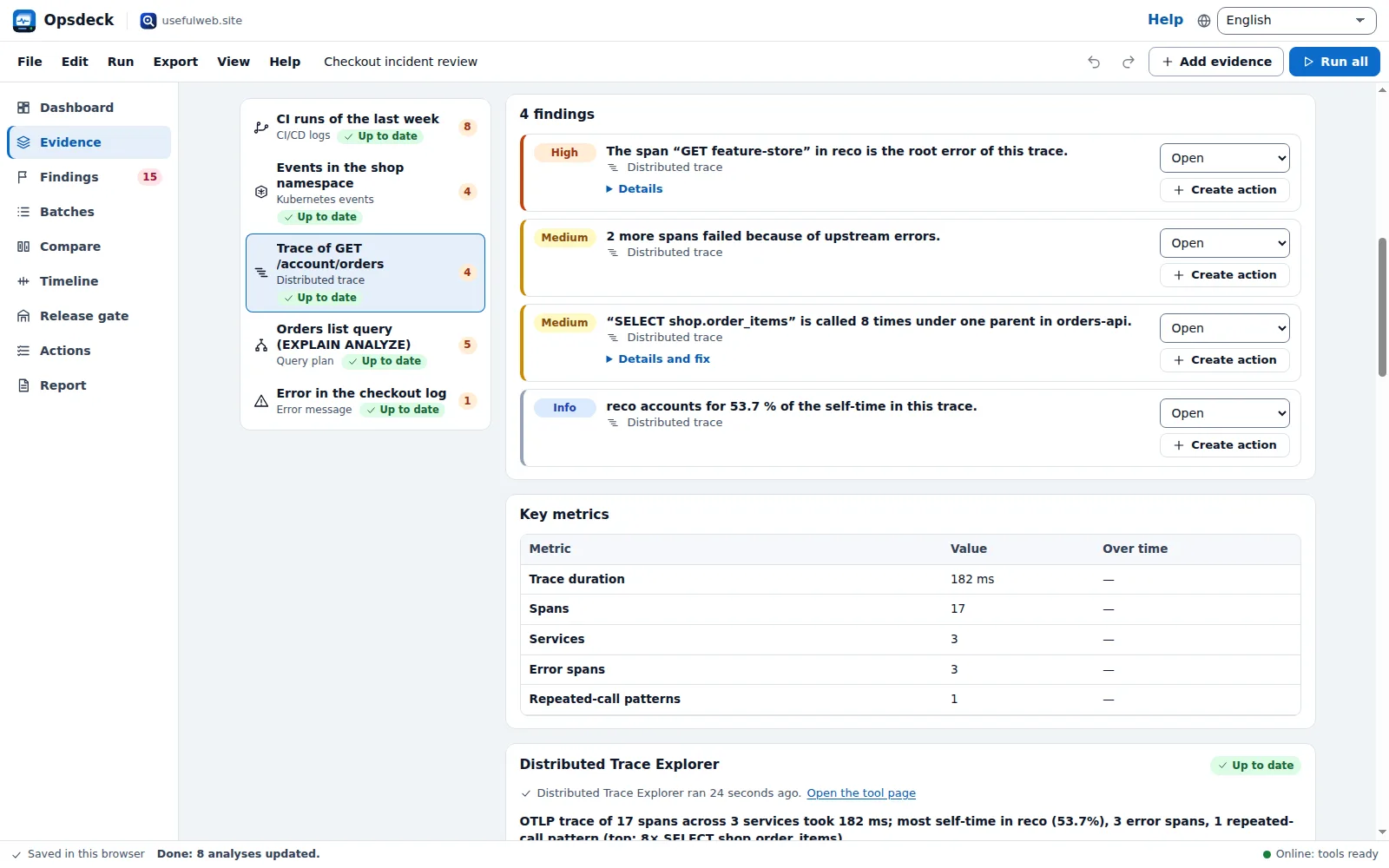
When you change the text later, the item shows Outdated until you run it again. Captured at (UTC) puts the evidence on the timeline.
Ready to try it?