Tutorial 6 of 7
Actions, business-day deadlines and the review meeting
Intermediate 9 min
Turn findings into actions, let RuleDate count business days with public holidays, export a calendar with reminders and find a fair meeting time with TimeFair.
Findings only help when someone fixes them. The Actions section (press 8) turns them into dated follow-ups.
1. Create actions
On Findings or the dashboard, press Create action next to a finding. The action takes the finding's sentence as its title, its severity and today as Found on; the finding is marked Acknowledged. Create actions for critical and high does this for every open critical and high finding at once. You can also type actions straight into the Action items table and set the Owner and Status.
2. Due dates in business days
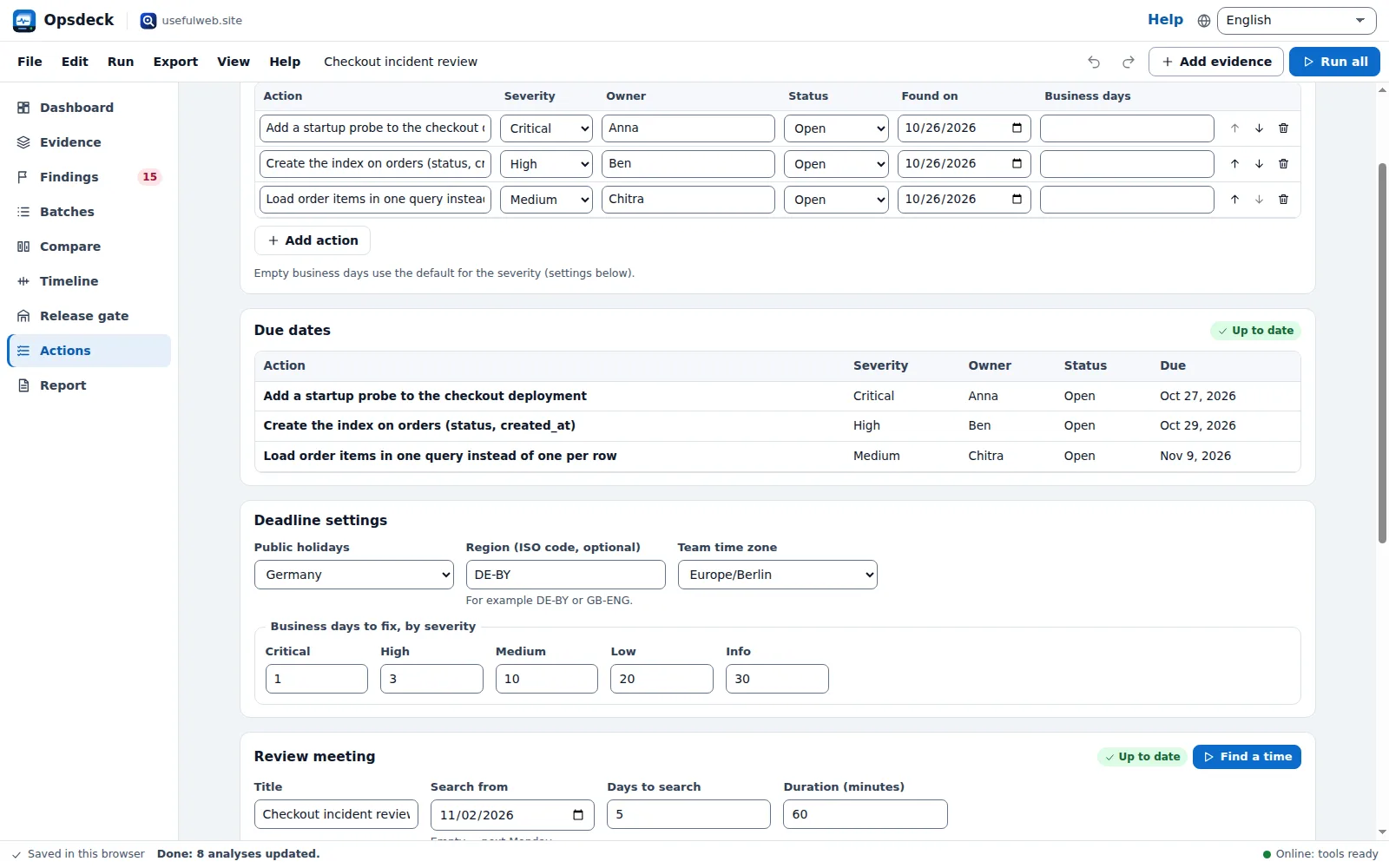
Each action is due a number of Business days after it was found. Leave the column empty to use the default for its severity under Deadline settings — 1 day for critical, 3 for high, 10 for medium, 20 for low. Choose Public holidays (for example Germany) and optionally a Region such as DE-BY or GB-ENG.
Press Calculate due dates. RuleDate adds the business days to each start date, skipping weekends and the public holidays of that region. In the Checkout incident review template the three actions get 1, 3 and 10 business days; when a holiday such as All Saints' Day falls into the window in Bavaria, the date moves by a day. Overdue actions are marked in red, and their due dates appear on the Timeline.
3. Calendar file with reminders
Calendar file (.ics)… writes one file with the due dates of open actions and, once found, the review meeting. Choose a reminder — 1 hour, 1 day or 2 days before. Outlook, Google Calendar and Apple Calendar import it; Opsdeck itself sends no notifications.
4. The review meeting
Under Review meeting, add the participants with their Time zone and working hours (the template has Anna in Berlin, Ben in New York and Chitra in Kolkata). Press Find a time. TimeFair checks every half hour over the days you choose, DST included, and ranks the slots by how inconvenient they are for each person; the table shows the best five with everyone's local time. The best slot goes into the calendar file.
Ready to try it?